Back to home Feature · Library management

Point it at your directories.
It figures out the rest.

Media Centaur watches your video directories, reads release-style filenames, and identifies every movie and TV show via TMDB — then pulls the artwork. High-confidence matches land in your library; anything ambiguous waits in review.
Filesystem eventsTMDB identificationConfidence-gated
Install All features
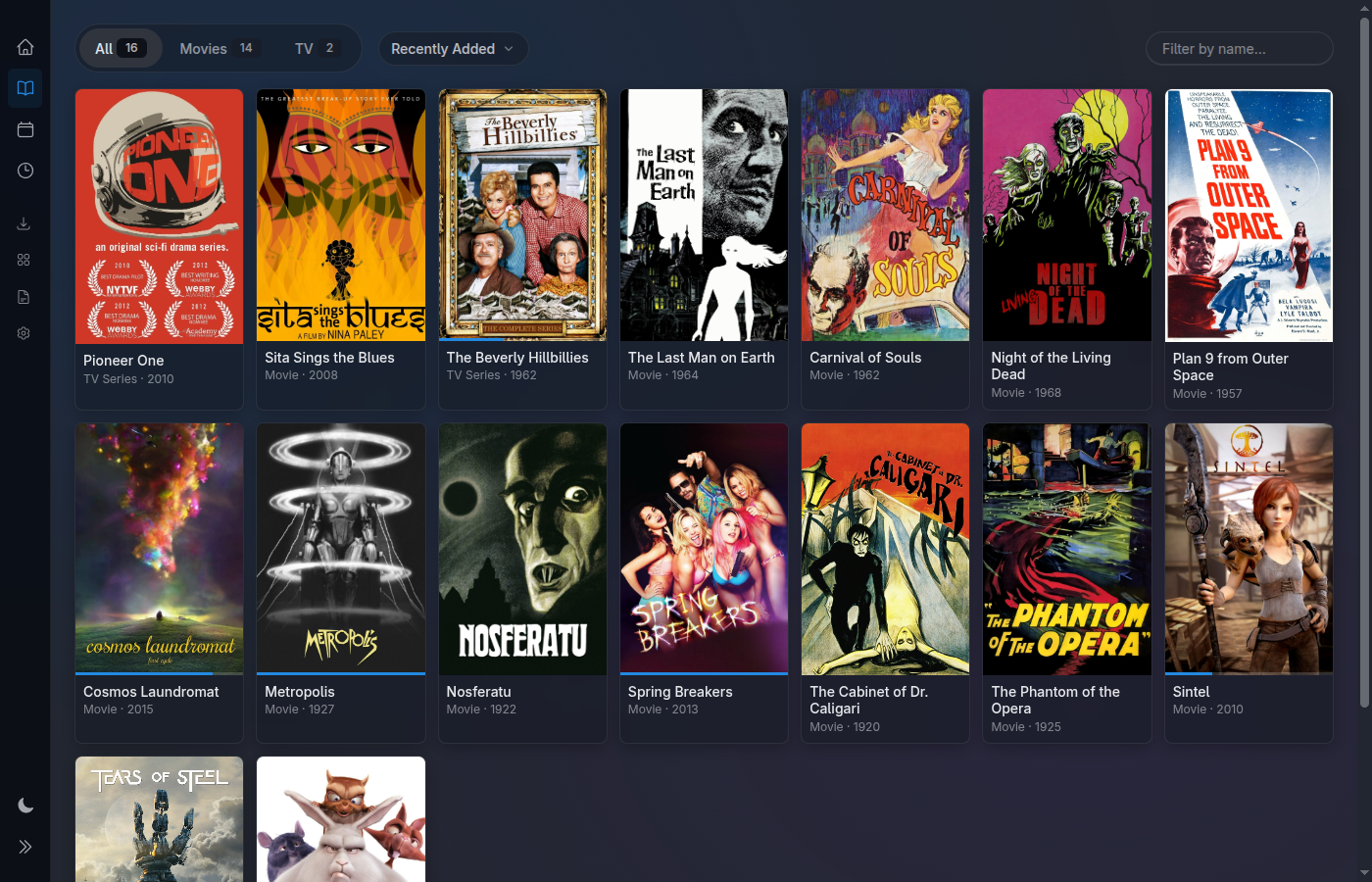
The library grid — a wall of poster artwork
The mechanics

From a file on disk to a finished shelf.

You drop a file in a watched directory and walk away. Media Centaur does the parsing, the lookup, the artwork, and the bookkeeping — and it knows when not to trust itself.

Identify

A filesystem watcher catches new and changed files the moment they appear. The parser reads release-style names — Sample.Show.S01E01.1080p.WEB-DL.mkv — and queries TMDB to pin down the exact movie or episode, season and all.

Artwork

Once a title is identified, Media Centaur downloads the posters, backdrops, and episode stills and caches them locally. The grid fills with real artwork — no placeholder tiles, no waiting on a remote image host at render time.

The review queue — no wrong guesses

Identification is confidence-gated. A clean, unambiguous match goes straight to the library. Anything uncertain — a sparse filename, two plausible titles — lands in a review queue instead of silently polluting your collection. You confirm; it commits.

Tracks the files, not just the titles

Each entity knows the actual files backing it on disk. Rename a file, move it to another watched directory, or delete it — the library follows. Movies and multi-season TV alike stay in sync with what's really there.

The confidence gate

A wrong guess never lands silently.

Every file walks the same four steps. The branch at the end is the whole point: certainty earns a spot on the shelf, doubt earns a second look.

01 · WATCH

A file appears

Filesystem events flag a new or changed file in a watched directory.

02 · PARSE

Read the name

The release-style filename is parsed into a title, year, season, and episode.

03 · MATCH

Ask TMDB

TMDB returns candidates; Media Centaur scores how confident the match is.

04 · GATE

Library or review

High confidence → straight into the library. Ambiguous → the review queue.

The review queue

The gate, in action.

When Media Centaur isn't sure, it shows you the file, the candidates it found, and the confidence behind each — and lets you make the call. Confirm the right match and it commits to the library; reject it and the file waits without ever entering your collection on a hunch.

Candidates ranked by confidence Movies · multi-season TV Nothing lands on a guess
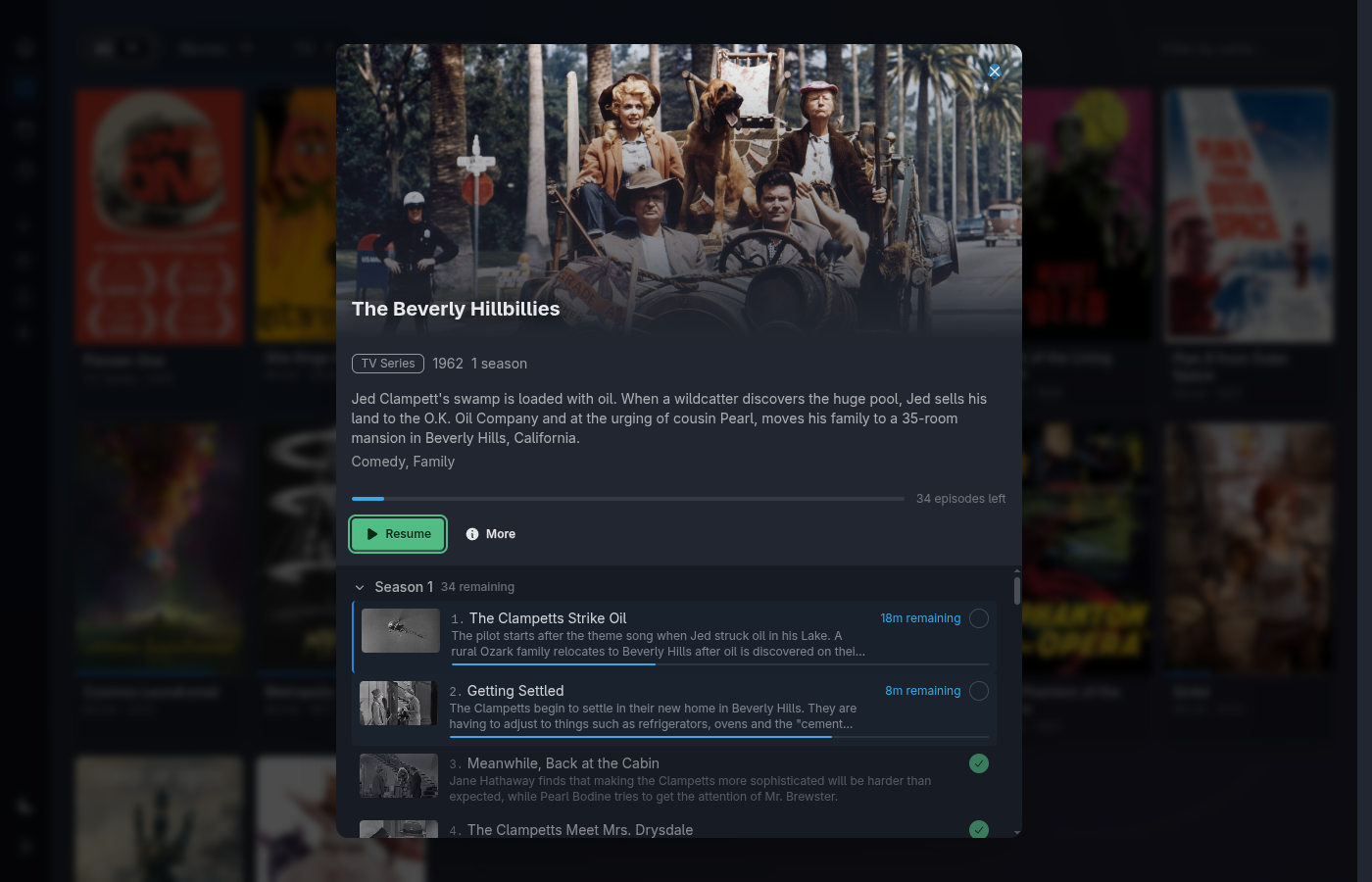
Series detail — seasons and episodes tracked to their files
Seasons & episodes

It tracks the files, not just the titles.

A TV show isn't one record — it's seasons, episodes, and the real files behind each one. Media Centaur keeps the map current: a present episode shows up, a missing one is visibly absent, and a moved file is re-linked rather than re-imported.

Because the library reflects what's actually on disk, renames, moves, and deletions just work. The shelf is a view of your directories, kept honest by the same watcher that filled it.

Point it at a directory. Watch it fill.

One line installs the latest release, verifies its checksum, and sets up a user service. Linux x86_64 is the primary, fully-supported platform; macOS Apple Silicon is experimental.

$ curl -fsSL https://raw.githubusercontent.com/media-centaur/media-centaur/main/installer/install.sh | sh